Running Out of Medication? Don't Get Caught Out
Running out of medication caught too late means a closed pharmacy. mojApteczka counts your supply, warns at a low-stock threshold and builds the shopping list.
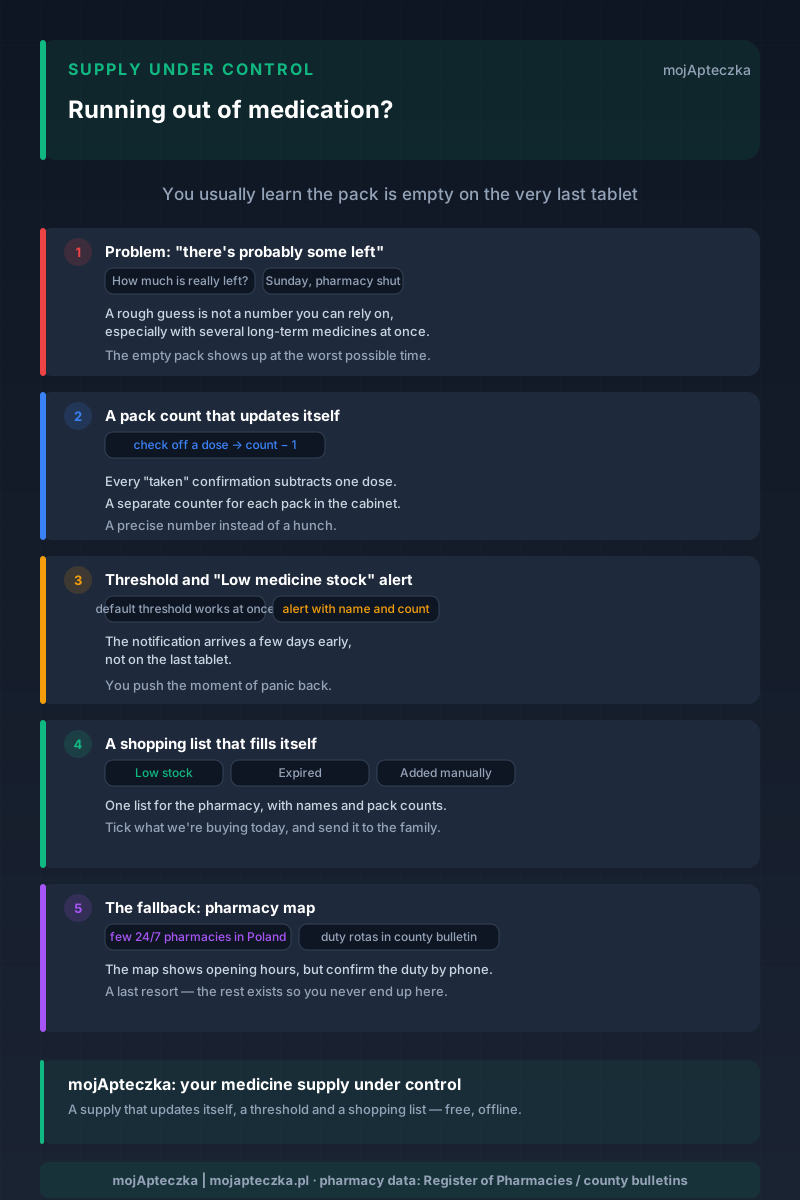
Sunday, half past seven in the evening. Your mum calls — she has one tablet left of a medicine she takes every day. The pharmacy on the corner is shut, the next one is a way off, and there is no telling whether it is even open. This is the classic moment: we find out about the empty pack on the last tablet, at the worst possible time.
This article is about how not to get caught out — from the angle of supply and organisation of medicines at home. Honestly, up front: this is not a piece about how much of anything to take, or when. What to do with a medicine and how to take it is a decision for you, a doctor or a pharmacist. Here we are talking about something simpler and often underrated — making sure the medicine is just there, before it runs out.
”There’s probably some left” is not a number
The most common way to keep an eye on supply is a glance into the drawer and a rough guess: “should last until the end of the week”. The trouble is that this is not a number you can rely on — especially when there are several long-term medicines in the house and the doses are spread across different times of day.
mojApteczka turns that hunch into a precise number. And it does so with no magic at all: it counts the supply from what you mark yourself.
A pack count that updates itself
The mechanism is trivially simple, and that is exactly why it works. Every time you check off a dose you have taken in the app, the pack count drops by one. If you use dose reminders, every “taken” confirmation updates the supply at the same time. There is no separate “count the medicine” step; the supply updates itself, in the background of your ordinary routine.
So the app knows how much is left the whole time. It does not scan anything on the sly and does not second-guess: it simply subtracts what you mark. The more faithfully you keep up the check-offs, the more accurate the count. It is the same principle the family medication tracker rests on: the data is only as good as how regularly you keep it up.
In practice it is rarely about one medicine. A typical home cabinet holds several, or a dozen, each in its own pack and on its own rhythm: one in the morning, another in the evening, a third only as needed. Keeping all of that in your head is simply unworkable, and that is precisely why supply most often “slips away” unnoticed. The app keeps a counter for each pack separately, so you need not remember which medicine was bought two weeks ago and which two months. You open the medicine card and see the current number, not your own hunch, which is usually too optimistic.
The threshold and the “Low medicine stock” notification
The number alone is only half the battle. The other half is to know in advance that it is getting too low.
That is what the threshold is for. For each medicine you set a minimum number of packs, for example “warn me when one is left”. When the count drops below the threshold, you get a notification with the medicine’s name and how much is left. One thing is crucial: this notification arrives a few days early, not on the last tablet. You push the moment of panic back and have a calm window of time to buy the medicine on a normal errand, rather than in emergency mode on a Sunday.
Why is the threshold set separately for each medicine? Because medicines run out at different rates. The one taken three times a day gets through a pack far faster than the one taken once daily, so for the same number of tablets “in reserve” you have fewer days of it left. For a medicine taken long-term, where a gap hurts the most, it is worth setting a higher threshold so the warning comes with more lead time. For an occasional medicine you reach for once a quarter, you can turn monitoring off entirely. You decide how many days of buffer you want for each preparation.
Don’t want to set thresholds by hand for every preparation? You don’t have to — a default threshold works straight away, as soon as you add a medicine. And if you want to fine-tune:
- last pack: a heads-up when you are down to the dregs,
- higher margin: useful for long-term medicines, where a gap hurts the most,
- monitoring off: for occasional medicines you don’t need to watch.
You decide which medicines call for vigilance. The low-stock and shopping-list feature exists so that vigilance need not depend on your memory.
A shopping list that fills itself
The notification says “buy”. The shopping list says “buy exactly this”.
It is a persistent list — it survives an app restart and exists independently of any single notification. It fills itself: everything that drops below the threshold or has just expired lands on it automatically. Expired medicines are a thread of their own, worth closing in parallel — expiry alerts help with that.
But the list is not just an automaton. You add items by hand too, three ways:
- from the medicine card in the cabinet (menu → “Add to basket”),
- from the medicine search (the basket icon next to a result),
- by typing a name straight onto the list — with suggestions from the register of all medicines (the full registry, tens of thousands of products), even for a medicine you do not have at home yet.
When the list grows — a few medicines low, a couple expired, something added before a family visit — category filters keep it tidy: expired, low stock, added manually. Instead of one long roster you see exactly what you are looking for.
One list for the whole family
A medicine cabinet is rarely “yours”. More often it is your mum’s, the children’s, your partner’s and your own medicines all in one place. That is why the shopping list works within a shared family cabinet: if one family member sees a shortage, everyone does. Nobody buys the same thing twice, and nobody assumes “someone else has probably topped it up”.
And when you want to send the list to someone, you stay in control. Each item has a checkbox, so before sending you tick only what we are buying today. You share the selected items (text message, messenger or PDF), not the whole twenty-item roster of a general tidy-up. What goes to the pharmacy is a short, concrete list, with names and pack counts.
This shows most clearly in caring for a senior’s medicines from a distance. Picture the typical setup: a parent lives in another city, takes five long-term medicines, and you look in once a week. Without a shared list, that contact is a string of phone calls — “check whether you still have the blood-pressure tablets” — and answers of “I think so, but I’m not sure”. With a shared list it is the other way round: the app on the parent’s phone adds the dwindling medicines to the basket itself, you see it on your end and buy them on the way, before anyone has to ask anything. The phone stops being a supply-control tool and becomes simply a conversation.
Works offline
The pack counts and the list are saved on the phone. They are counted and available even with no network — at the cottage, in a basement pharmacy with no reception, on the train. When the internet is back, syncing with the family’s other devices catches up on its own. You do not lose access to the list at the most inconvenient moment just because there happens to be no signal.
The fallback: when the medicine isn’t there now
Even so, sometimes you don’t make it in time. The medicine has run out, it is Sunday, you have to act today. That is when the app has a pharmacy map — it shows pharmacies and their opening hours, that is, which ones by those hours should be open right now.
But let’s say plainly how this really works in Poland. Round the clock, seven days a week, literally a handful of pharmacies operate across the whole country. The rest are on-duty rotas set by the county, and their schedule is posted in the county office’s public information bulletin, not always reaching any database at all. So if it comes to it, confirm the duty by phone — before you set off. We have given finding an open pharmacy in the middle of the night a piece of its own: 24-hour and on-duty pharmacies in Poland.
Most important, though: this fallback is meant to be a last resort. Everything else — the real-time count, the threshold, the early notification, the shopping list — exists precisely so that you never have to reach for it.
How many days of supply is a sensible margin?
A caveat right away: this is not advice on how much medicine you “should” keep at home. How much of a preparation to keep and how long to take it depends on your treatment and what you agree with a doctor or pharmacist. The point here is pure logistics: setting the threshold in the app so the warning reaches you with sensible lead time.
In practice, a few days of buffer solves most problems, because that is roughly how long an awkward run of bad timing can last. The worst moments are not ordinary weekdays but long weekends and holidays, when smaller pharmacies are shut and the only open one may be the on-duty one a few kilometres away. If the low-stock notification comes a few days ahead, that kind of weekend stops being a threat: you top the medicine up calmly, earlier, on a normal errand.
So for medicines taken long-term it is worth setting the threshold with some headroom, not “cutting it fine”. Better to get a reminder a day or two too early than to hit a closed pharmacy once every six months with an empty pack in your hand. The app imposes no number here; it gives you a slider you set yourself, for as much comfort as you want.
What the app doesn’t do
Whether to continue a medicine, change it or stop it is not the app’s decision. mojApteczka does not prescribe, does not order for you and does not assess your treatment. It shows the facts about supply — how much is left, what is missing, what to buy — and stops exactly where medical knowledge begins. Decisions about treatment are yours to make with a doctor or pharmacist.
That is a deliberate line, the same one we hold in the piece on a missed medication dose: the app is a tool of memory and order, not advice. If you are looking instead for how not to forget doses in the first place, start with the guide on how not to forget your medicines — it is the same house, just seen from prevention rather than supply.
The heart of it is simple. “There’s probably some left” is not a number you can build a family’s peace of mind on. The app turns that hunch into a precise number and gives you a few days of supply before it becomes a problem. What you do with that is your decision.
🎧 This article grew out of the mojApteczka podcast, episode 12 — “The medicine ran out on a Sunday. How not to panic”. We tell the same story there — with that Sunday call from mum in the background — out loud, in under seven minutes.
mojApteczka is free and works offline (after the first sync). Add a medicine, set a threshold and let the app watch the supply for you: mojapteczka.pl.
Frequently asked questions
- How does the app know how much medicine I have left?
- It counts it in real time. Every time you check off a dose you have taken, the pack count drops by one. mojApteczka does not scan anything in the background and does not guess — it simply subtracts what you mark yourself. So instead of "there's probably some left" you have a precise number.
- What is a low-stock threshold and do I have to set it?
- The threshold is the number of packs below which a medicine goes onto the shopping list and you get a notification — for example "warn me when one pack is left". You do not have to set it by hand for every medicine: a default threshold is already active. For medicines taken long-term you can raise the margin, and for occasional ones you can turn monitoring off.
- Will the app order or buy the medicine for me?
- No. mojApteczka is an organizational tool — it shows what is missing and prepares a ready list for the pharmacy, but it does not place orders or buy medicines for you. Buying the medicine, and deciding whether to continue treatment, stay with you, together with a doctor or pharmacist.
- How does the shopping list work?
- It is a persistent list that fills itself. Whatever drops below the threshold or has just expired lands on it automatically. You can also add an item by hand — from the medicine card, from the search, or by typing a name from the register of all medicines, even one you do not have at home yet. Filters (expired, low stock, added manually) keep the view tidy.
- Can I send the list to someone in my family?
- Yes. Each item has a checkbox — before sending you tick only what we are buying today, and you share the selected items by text message, messenger or as a PDF. Within a shared cabinet everyone in the household sees the list, so nobody buys the same thing twice.
- Do the list and counts work without internet?
- Yes. The pack counts and the shopping list are saved on the phone, so they are counted and available even with no signal — at the cottage, say, or in a basement pharmacy with no reception. Syncing with the family's other devices catches up on its own once the internet is back.
- And if the medicine still runs out on a Sunday?
- The app has a pharmacy map with opening hours — it shows which ones should be open right now. It is worth knowing how this works in Poland, though: round the clock, seven days a week, literally a handful of pharmacies operate across the whole country. The rest are on-duty rotas set by the county, and their schedule is posted in the county office's public information bulletin — so it is best to confirm the duty by phone. This is a fallback; everything else exists so you never have to use it.