Organizing a Cabinet of Many Daily Meds
A relative takes 5+ medicines every day and it is easy to lose track? See how to list, group and keep a whole cabinet in one place, without the chaos.
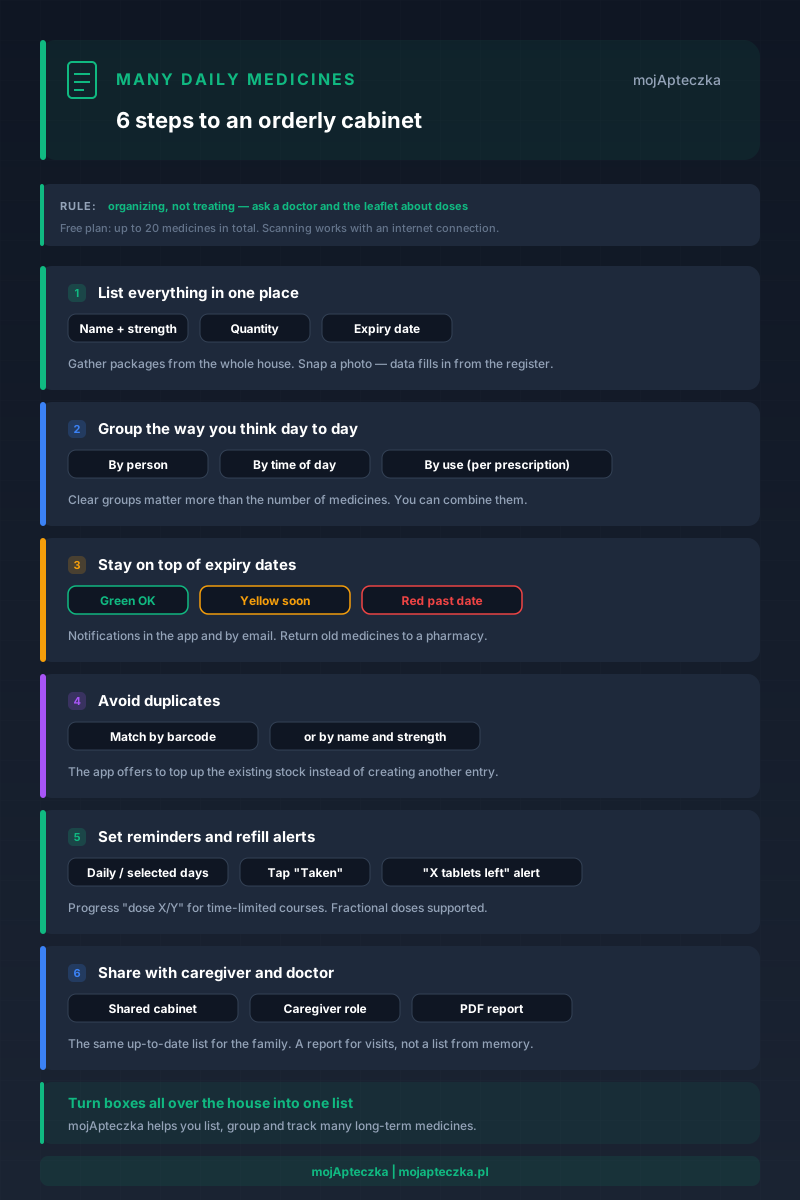
Half the bathroom cabinet taken up by boxes. Three packs of the same medicine, each with a different expiry. A note on the fridge that stopped being accurate weeks ago. That is what a home looks like when someone close takes five, eight, or more medicines every day.
This is not about treatment — that is what the doctor and the pharmacist are for. It is about something far more down-to-earth: order. When the medicines pile up, it is easy to lose track. Easy to buy what you already have. Easy to miss that something is running low or has expired. And easy to be unsure what exactly to tell the doctor at the next visit.
This guide is about exactly that — how to get a grip on many medicines taken regularly, whatever they are for. Diabetes, high blood pressure, asthma — those are just examples of situations where the list grows long. We do not get into how to treat any of those conditions. We show how to list this whole set, group it, and keep it under control.
This is about organizing a cabinet when there are many long-term medicines — for anyone in the family, at any age. The specifics of polypharmacy and medication safety in older people are covered separately, in Polypharmacy — how to manage multiple medications in an elderly relative. They are two different topics: here it is tools and order, there it is seniors and risks.
Why many medicines turn into chaos
A few as-needed medicines in the cabinet are not a problem. The problem starts when some of them have to be taken daily and for a long time. Then:
- Medicines enter the home from different sources — by prescription, from the pharmacy, after a visit, sometimes online. Every new package is one more thing to keep track of.
- The same substance shows up under different brand names. Without a list you cannot see that you have it twice.
- One medicine’s stock runs out faster than another’s, because they are taken at different frequencies.
- Expiry dates drift apart over time — something bought six months ago will expire before something fresher.
Memory will not carry this. A note on the fridge goes stale after the first purchase. So the first step is moving all of it into one place that keeps itself up to date.
There is one more reason to do this calmly rather than in a rush. The longer a therapy lasts, the more small changes pile up: the doctor adjusts a dose, swaps one product for another with the same composition, adds something for winter, or stops one of the medicines. Without an up-to-date list, those changes blur in memory, and after a few months nobody is quite sure what counts as “current”. A list that is easy to edit means each such change takes a moment, not an evening with a magnifying glass over the packaging.
Step 1: write everything into one list
It sounds obvious, but it is the foundation. Gather every package from around the house — bathroom, kitchen, bedside drawer, car, bag. Put them all on the table together. As long as the medicines are scattered, there can be no order.
Then each medicine goes on the list with four pieces of information:
- Name (as on the package),
- Strength (e.g. 500 mg, 10 mg),
- Quantity left,
- Expiry date.
In mojApteczka you do not have to type this in by hand. You take a photo of the package with your phone camera, and the app recognizes the name, substance, strength, form, and expiry, then fills in the data from Poland’s official Medicinal Product Register. The medicine lands on the list complete with its details. Scanning is a cloud feature — it works when the phone has an internet connection.
It is worth adding two more details while you are at it, if you have them: what the medicine is for according to the doctor’s instructions (not your own diagnosis) and a short note, such as “for mum, morning” or “after the May 12 consultation”. Such notes cost nothing, yet they can save the day when someone else reaches into the cabinet, or when six months later even you do not remember where a package came from.
One note on capacity: the Free plan covers up to 20 medicines in total. With a long list of long-term medicines plus the usual as-needed supplies, that limit can fill up — that is when the higher-limit plans come in. Good to know from the start, so you list the whole cabinet at once rather than piece by piece.
Do not rush toward perfect order on the first attempt either. First, get everything onto the list — even roughly. You will add grouping, notes, and reminders once you can see the whole picture. The simple fact that all the medicines are in one up-to-date list is a bigger change than any further detail.
Step 2: group them the way you think day to day
A list on its own is only half the win. With a dozen entries you need structure to find anything fast. The best structure is the one you already use in your head.
Three proven ways to group:
- By person. Mum, dad, child — each has their own part of the list. It is the first thing you do when more than one person at home has their own set of medicines.
- By time of day. Keeping “morning” and “evening” medicines apart immediately shows what goes when. But remember: when to take a given medicine is set by the doctor and the leaflet — you are only organizing what was prescribed.
- By the use noted by the doctor. Not by your own diagnosis, but by what is written on the prescription or in the instructions.
You do not have to pick just one. In a family where several people take long-term medicines, grouping by person naturally combines with time of day: first “who”, then “when”. What matters most is that the layout is obvious to you — because you, or a second caregiver, will be reaching for it in a hurry.
More on arranging a cabinet into groups in the guide Grouping medicines in your cabinet — order without chaos. In mojApteczka you map groups using the medicine grouping feature and notes on each entry.
Step 3: stay on top of expiry dates without constantly checking
With a long list, checking dates by hand is a dead end. Something always slips through. So it is worth letting the app keep its finger on the pulse.
mojApteczka tracks dates automatically and color-codes medicines: green — all good, yellow — expiry approaching, red — past date. You also get separate “Soon” and “Expired” tabs, so a single glance shows what needs attention. When a date is approaching, you get an in-app notification.
With long-term medicines, expiry has one more, easy-to-miss dimension. When you take something daily, the package usually runs down before it can expire. But “just in case” medicines — a second pack bought as backup, a product the doctor stopped, something seasonal — can sit for months. Those are the ones most likely to expire unnoticed. The color labels help you catch them before they become useless.
What do you do with old medicines once you have caught them? Not in the bin and not down the drain — return them to a pharmacy. We laid that out in What to do with expired medicines. On the app side, you are supported by expiry alerts.
Step 4: do not buy the same thing twice
The longer the list, the higher the chance you buy a medicine you already have — often under a different brand name. That is plain wasted money, and amid the clutter it is also a risk of mistakes.
Here duplicate detection, currently available in the Android mobile app, helps. When you add a new package, mojApteczka checks whether such a medicine is already in the cabinet — comparing the barcode, or the name and strength. If it recognizes one, it offers to add the stock to the existing entry (and optionally update the expiry) instead of creating another, confusing item. That keeps the count accurate and stops the list from swelling with repeats.
It sounds like a minor thing, but with a long list it is a real difference. Two entries for the same medicine mean a falsified stock count: the app “sees” twice as much as you have, so the refill alert arrives too late. And when a medicine appears under two brand names, failing to merge them into one entry makes a mistake easy when dispensing. One medicine = one entry is a simple rule that holds order all the more firmly the more entries you have.
The flip side of the same problem is interactions. mojApteczka can show basic interactions between medicines in your cabinet (based on DDInter 2.0 data) — but that is information, not a clinical decision system. Take any doubt to a doctor or pharmacist. If you like, you can check interactions yourself at any time.
Step 5: set reminders for taking and for refills
A listed and grouped cabinet is order. Reminders are peace of mind — especially when there are several long-term medicines at different times.
In mojApteczka you set medication reminders flexibly: daily, on selected days of the week, or every set number of days. When the time comes, you confirm a dose with one tap (“Taken”). For time-limited courses the app shows progress — for example “dose 4 of 7” or “day 3 of 10” — so you can see how much is still ahead. It also handles fractional doses (e.g. half a tablet).
The other half is stock. You can set a refill threshold for a given medicine — when it is running low, you get a separate notification along the lines of “X tablets left”. What is more, if at the moment of a reminder there is less stock than the dose, the app appends a warning to the notification so you have time to restock. That closes the loop: you neither run out nor overbuy what you already have plenty of.
We develop this “what to do so you do not forget” angle in Medication reminders — how not to miss a dose.
Step 6: share the list with the caregiver and the doctor
With a chronic condition it is rarely the case that one person handles everything. A second caregiver steps in, an adult child, and sometimes you have to sum it all up for the doctor in five minutes. So a list only one person can see is a bottleneck.
Two ways to share in mojApteczka:
- Shared cabinet. You can have several cabinets (e.g. “home”, “summer house”, “car”) and invite family into them. Everyone sees the same up-to-date list — no more “do we still have this at home?”. For dependents (a child, an elderly parent) there is the ward system: you can assign a caregiver to a ward, who receives notifications about that person’s medicines. This is backed by the shared family cabinet feature.
- PDF report for the doctor. In one move you generate a PDF report with the current medication list, doses, and expiry dates. You take it to the visit instead of listing products from memory. How to prepare well for that conversation is covered in How to prepare a medication list for a doctor’s visit.
If you care for an elderly parent or a relative with a longer medication list, you will find more practical tips on the for caregivers page.
What mojApteczka does not do — and that matters
Honestly: mojApteczka is an organizational and informational tool, not a medical advisor. What does that mean in practice?
- It does not set doses or a treatment plan. That is always the doctor’s decision, and the details are in the leaflet and the product characteristics.
- It does not diagnose and does not suggest “what to take” for a given symptom.
- It does not replace a doctor or pharmacist. It shows basic interactions (DDInter 2.0) as information — not as a clinical decision system.
And one more thing, for clarity: using the app requires an account, and your data syncs between devices. That is what lets the family see the same up-to-date list. Camera scanning works when you are online.
What mojApteczka really does well is order: one list instead of boxes all over the house, clear groups, tracking dates and stock, fewer duplicates, and a simple way to share it all with family and the doctor. With many long-term medicines, it is precisely this order that takes away the most stress.
Where to start today
Do not try to do everything at once. Three moves are enough:
- Gather and list all the medicines in one place — even tonight.
- Group them the way you think about them: by person or by time of day.
- Set reminders and alerts, so the app watches the dates and stock for you.
The rest — duplicates, the report for the doctor, shared access — you will add along the way. The most important thing is the first step: turning a chaos of boxes into a single list you can trust.
Frequently asked questions
- A relative takes five medicines every day. Where do I start?
- Start with a single list. Gather every package from around the house in one place and write each one down: name, strength, quantity, expiry date. Only a complete list shows what you actually have.
- How do I avoid mixing up medicines when there are a dozen of them?
- Group them the way you think about them day to day — by person, by time of day, or by the use your doctor noted. Clear groups matter more than the number of medicines.
- What about medicines that repeat under different brand names?
- When you add a new package, mojApteczka can recognize that you already have it (by barcode or by name and strength) and offer to top up the existing stock instead of creating another entry. This feature is currently available in the Android mobile app and limits accidental duplicates.
- How do I share the medication list with a doctor or a second caregiver?
- You can generate a PDF report with the current list and take it to a visit. You can also invite another person to the cabinet so they see the same up-to-date list.
- Will the app tell me how to dose medicines for a chronic condition?
- No. mojApteczka is an organizational tool — it helps you list and keep track of medicines. For dosing, the treatment plan, and interpreting symptoms, always ask a doctor or pharmacist and read the leaflet.
- How many medicines fit in the free plan?
- The Free plan covers up to 20 medicines in total. For a longer list there are Standard and Pro plans with higher limits.