Organizing Your Medicine Cabinet After Discharge
Home from hospital with a discharge sheet full of medicine names? Log medicines, set reminders, check expiry dates, and share the list with a caregiver.
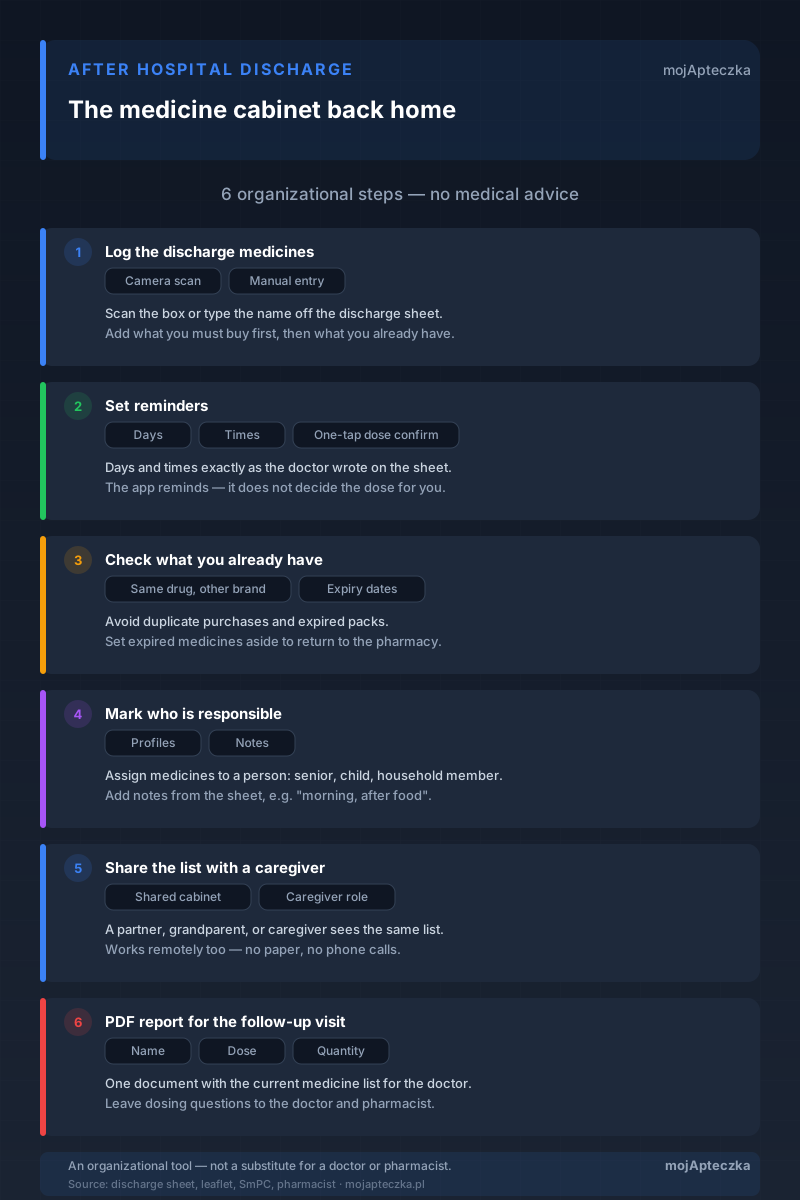
You are coming home after a few days in hospital. In your hand is a discharge sheet, and on it a list of medicines: names, doses, times, sometimes notes in tiny handwriting. Some of the products still need to be bought; others are probably already somewhere in the house. And it is that strange feeling — everything is there on paper, yet you have no idea where to start.
This is a very common moment. A hospital discharge, or a relative coming home after a procedure or a flare-up, usually means a new set of medicines to sort out within a few hours — and often exactly when everyone is tired and thinking about something else entirely. Mistakes come easily: buying a second pack of something you already have, missing a dose in the rush, losing the sheet.
This guide is not about treatment. We will not tell you how to take specific medicines or what to do about symptoms — that is what the discharge sheet, the treating doctor, and the pharmacist are for. What we will show you is something you can do yourself, right away: organize the medicine cabinet after discharge so nothing gets lost. Step by step, on the organizational side.
Start from one place, not from the sheet
The discharge sheet has one flaw: there is only one of it. It is easy to leave it in the kitchen, tuck it into a bag, or spill tea on it. And the information on it is needed more than once — when giving out medicines, when shopping, at the follow-up visit, sometimes for whoever takes over the care for a weekend.
So the first move is to transfer that information into one always-available place. On your phone you always have it with you, and if you invite household members to a shared cabinet, everyone sees the same thing. It is worth keeping the sheet — it is a document — but the daily work now happens in the app.
mojApteczka is an organizational tool: it helps you know what you have at home, whether it is current, and who is responsible for what. It is not a medical advisor, it does not make diagnoses, and it does not replace a conversation with a doctor or pharmacist. Direct questions about dosing, possible side effects, and stopping medicines to a pharmacist or the treating doctor — the app organizes the information from the discharge sheet, it does not replace medical advice.
The good news is that this whole organizational part can be done the same day, at the kitchen table. It takes no medical knowledge and no special equipment — just the discharge sheet, a phone, and fifteen quiet minutes. Below we break it into six steps worth going through in order. You can treat them as a checklist: each one closed means one fewer thing to keep in your head.
Step 1: Log the medicines from your discharge sheet
Take the discharge sheet and go medicine by medicine. You have two routes, depending on whether the medicine is already at home.
If you have the box to hand — scan it with your camera. The medicine scanner recognizes the product from a photo of the box and pulls the data from the official drug registry (Rejestr Produktów Leczniczych): name, active ingredient, form. You do not have to copy anything off the fine print — it saves time and reduces the risk of a typo in the name.
If you have not bought the medicine yet — add it by hand, typing the name exactly as it appears on the discharge sheet. After your trip to the pharmacy you will complete the rest of the details, and the product itself is already on the list from the start, so nothing slips through while you shop.
For each medicine it is worth writing down what is on the sheet right away, but copy it faithfully — without your own interpretation. If something is illegible or you are not sure exactly what to take and how, that is a question for the pharmacist at the counter, not for the app.
A practical tip: start with the medicines you need to buy immediately, and only then add the ones you already have at home. That way, from the first moment, you can see what to take to the pharmacy and you will not come back without something important. If the discharge sheet has a lot of items, you do not have to fill in every field at once — just the name on the list is enough to keep a medicine from getting lost, and you can add the details after shopping.
If you log medicines before appointments more often, our separate guide will also help: how to prepare a medicine list for a doctor’s visit. Here we are doing essentially the same thing, only the starting point is the discharge sheet.
Step 2: Set reminders for the times on the discharge sheet
After hospital, the medicine schedule can be dense: one medicine in the morning, another twice a day, a third as needed, plus something that was there before. In the first days at home, when the routine is only just forming, it is easiest to miss a dose.
This is where reminders help. For each medicine you separately set the days of the week and the times — exactly as the doctor wrote them on the discharge sheet. At the appointed time you get a notification, and after taking the medicine you confirm it with one tap. On confirmation, the pack count goes down automatically, so you can see not only when to take a medicine but also how many doses are left.
What matters is what the app does and does not do. A reminder is an alarm clock and a notepad in one — it reminds you of the time and records that a dose was taken. It does not make any medical decision for you. If a dose is missed or you are not sure how to proceed, that is a question for a pharmacist or the treating doctor — especially for medicines where a mistake has serious consequences. The app will show you the facts (what was taken and when), but it is a person who decides what to do with them.
In the first days after discharge, it especially helps that confirming doses leaves a clear trail. When several people give out the medicines — you in the morning, someone else in the evening — the question “has this medicine already been given today?” comes up easily. The record in the app answers it without phone calls or guesswork. It is a purely organizational function: it does not judge whether the schedule is right, it just shows what happened.
Step 3: Check what you already have at home
Before you head to the pharmacy for new medicines, do a review of what is already in the cabinet. Two things here are genuinely worth your attention.
The same medicine under a different name. It is very easy to buy a second pack of a product you already have — only under a different brand name, because “the pharmacy said it was a substitute.” After discharge the risk grows, because new items are added. When all the medicines are in one cabinet, it is easier to catch a situation like that. If you want to compare products with the same active ingredient, look at the substitutes feature — but settle which one to take with a pharmacist or doctor. The app shows the options; it does not choose for you.
Expiry dates. After hospital, a mix of old and new often remains at home. Set expired packs aside to return to the pharmacy — most pharmacies accept medicines for disposal. Tidy up the rest so you do not confuse what is current with what is waiting to be thrown out. We write more about the review itself and about disposing of medicines safely in our guide on what to do with expired medicines.
When expiry dates are entered in the app, you do not have to keep them in your head. mojApteczka reminds you before any pack expires — which after discharge is doubly useful, because a few new medicines usually arrive while the old ones still sit in the cabinet. One review at the start plus automatic alerts later mean you will not discover an expired medicine precisely when it is urgently needed.
This is also a good moment to physically sort the medicines — the ones from the discharge sheet separately, the household’s regular medicines separately, the packs for return separately. The app organizes the information, but the real cabinet should be readable too, especially if more than one person gives out the medicines. Consistent order in the phone and in the cabinet means a smaller chance that someone reaches for the wrong box in a hurry.
Step 4: Mark who is responsible for what
If a senior or a child is coming home from hospital, the medicines on the list are usually not “yours” — they belong to a specific person. And it happens that there are several such lists in one home at once: mum’s medicines after a procedure, dad’s regular medicines, something for the child. Without order it is easy to get lost in this, especially when more than one person is giving them out.
So it is worth assigning the medicines to the right profile and adding notes straight from the discharge sheet — for example “morning, after food,” “do not combine with medicines for the same symptom without checking,” or “spare pack in the drawer.” That kind of context usually lives only in one person’s head and disappears when that person happens not to be home. Saved alongside the medicine, it is available to anyone who is giving it out at the time.
For a senior taking many medicines at once, a wider view also comes in handy. We devoted a separate piece to managing multiple medications for a senior — a hospital discharge is often the moment when a senior’s medicine list changes again and has to be put back in order.
Step 5: Share the list with a caregiver
Care after discharge rarely rests on one person. Someone is at work, someone comes over for the weekend, someone calls in the evening to check that everything is fine. The problem is that information about the medicines usually sits in someone’s head or in the family chat — and when it is needed most, it is not there.
There are two simple ways around this. You can invite your family to the shared cabinet — then a partner, grandparent, or caregiver sees the same up-to-date medicine list as you. Or grant someone the caregiver role, which lets them manage a relative’s cabinet: view the medicines, check expiry dates and notes, add a new product. It works remotely too, so you do not have to be physically next to someone to know what is at home and what needs restocking.
This is not “sharing notes.” It is a shared, always-current picture of what the person in your care is taking — without sheets of paper, phone calls, and guesswork. If you care for someone permanently, you will find more practical tips on the for caregivers page and in our guide on the caregiver’s role in managing a family’s medicines.
Step 6: Prepare a PDF report for the follow-up visit
After discharge there is almost always a follow-up visit. And it almost always starts with the question: “What medicines are you taking now?” After hospital the answer is harder than usual, because the list has changed, new products have arrived, and some of the old ones may have been stopped.
Instead of reconstructing it from memory, generate a PDF report for the doctor. It is a single document with the current medicine list: name, dose, quantity, expiry dates. You hand it over in the consulting room or send it during a telehealth appointment and get straight to talking about what matters, instead of wasting time listing products.
The report is especially helpful when you are accompanying a senior or a child to a check-up, when you are consulting several specialists after discharge, or when you want the doctor to have the full picture before making a decision. Just remember that the report is material for a conversation — questions about dosing, combining medicines, and stopping them belong to the doctor and the pharmacist, not to the app.
What this guide deliberately leaves out
For clarity, because after hospital other questions are tempting. You will not find advice here on how to take specific medicines, how to recognize symptoms, when a medicine can be stopped, or what to do about discomfort after a procedure. That is not a subject for the app or for an organizational guide — it is the domain of the treating doctor, the pharmacist, and the information in the discharge sheet itself, the patient leaflet included with the medicine, and the Summary of Product Characteristics (SmPC).
mojApteczka helps you organize all of this and keep it to hand: log it, remind you, check expiry dates, divide up responsibility, share it, and show it to the doctor. Decisions about the treatment itself stay where they belong — with the specialists. And that is the way it should be: a good tool does not pretend to know more than it knows.
Summary
Coming home from hospital means a lot of information at once and usually little calm to sort it out. If you break it into six simple steps — log the medicines from the discharge sheet, set reminders, check what you already have, mark who is responsible for what, share the list with a caregiver, and prepare a report for the check-up — the first days at home become far lighter. Not because the app heals, but because nothing gets lost and everyone involved sees the same thing.
Set up a cabinet in mojApteczka and log the medicines from your discharge sheet before the paper has a chance to go missing.
Frequently asked questions
- What is the fastest way to log medicines from the discharge sheet?
- The fastest way is to scan the box with your camera — the app recognizes the medicine and fills in the data from Poland's official drug registry (Rejestr Produktów Leczniczych). For medicines you do not have at home yet, type in the name shown on the discharge sheet and complete the details after you buy them at the pharmacy.
- What should I do if I already have the same medicine under a different brand name?
- Add the new medicine and keep the old one on the list, then check its expiry date. If you want to compare products with the same active ingredient, the substitutes feature helps. Leave the decision about which product to take to a pharmacist or doctor — the app only organizes the information.
- How do I share the medicine list with a partner or caregiver?
- Invite them to the shared cabinet, or grant the caregiver role. They then see the same up-to-date medicine list, expiry dates, and notes — including remotely, when they are not physically nearby.
- Will mojApteczka tell me what to do if I miss a dose?
- No. The app reminds you when it is time and records whether a medicine was taken, but it does not decide whether to double up or skip a dose. Direct those questions to a pharmacist or the treating doctor.
- What should I prepare for the follow-up visit after discharge?
- Generate a PDF report with the current medicine list — name, dose, quantity, and expiry dates. Add notes about anything that worries you so nothing slips your mind in the consulting room. Save questions about dosing and stopping medicines for the doctor.