Medicine Leaflet Too Small to Read? 4 Fixes
A phone cannot read a paper leaflet aloud. Four routes to the content when the print is too small: a magnifier, the official file, screen reading, a pharmacist.
You open a new box. Out falls a sheet folded like a concertina, thinner than tissue paper, printed on both sides in letters the size of ants. You move it closer to the lamp. You hold it out at arm’s length. You put on a second pair of glasses. And then you put the sheet down on the worktop, because it simply cannot be read.
This is not a problem of understanding. Understanding would be fine. This is a problem of reaching the content: the print is physically beyond your eyesight. If you can see the print but get lost in the sections and do not know what to look at first, the article for you is our guide to reading a medicine leaflet. This one is about something else: what to do when you cannot read it at all and you need the content in another form.
A phone reads text, not paper
Let us start with the distinction that decides everything that follows.
A phone can do a great deal: enlarge, change the contrast, read aloud. But it does all of that to text. The sheet from the box is not text. It is an object. Take a photo of it and it is still not text, just a picture with letters on it.
An honest caveat, because it would be easy to keep quiet about it: newer phones can recognise text in a photo. On a receipt, a business card or a sign with a house number, that works well. A leaflet is harder: three pages of dense print, two columns, paper you can see through. The recognition drops fragments, merges the columns and skips headings, and you have no way of checking what went missing, since you cannot see the original anyway. For a receipt it is enough. For content where you want to be sure that nothing fell out, it is not.
This is why the advice “just scan the leaflet with your phone, it will read it out” usually ends in disappointment. To hear the content reliably, you first have to get hold of it as text. Getting hold of the text is what the rest of this guide is about.
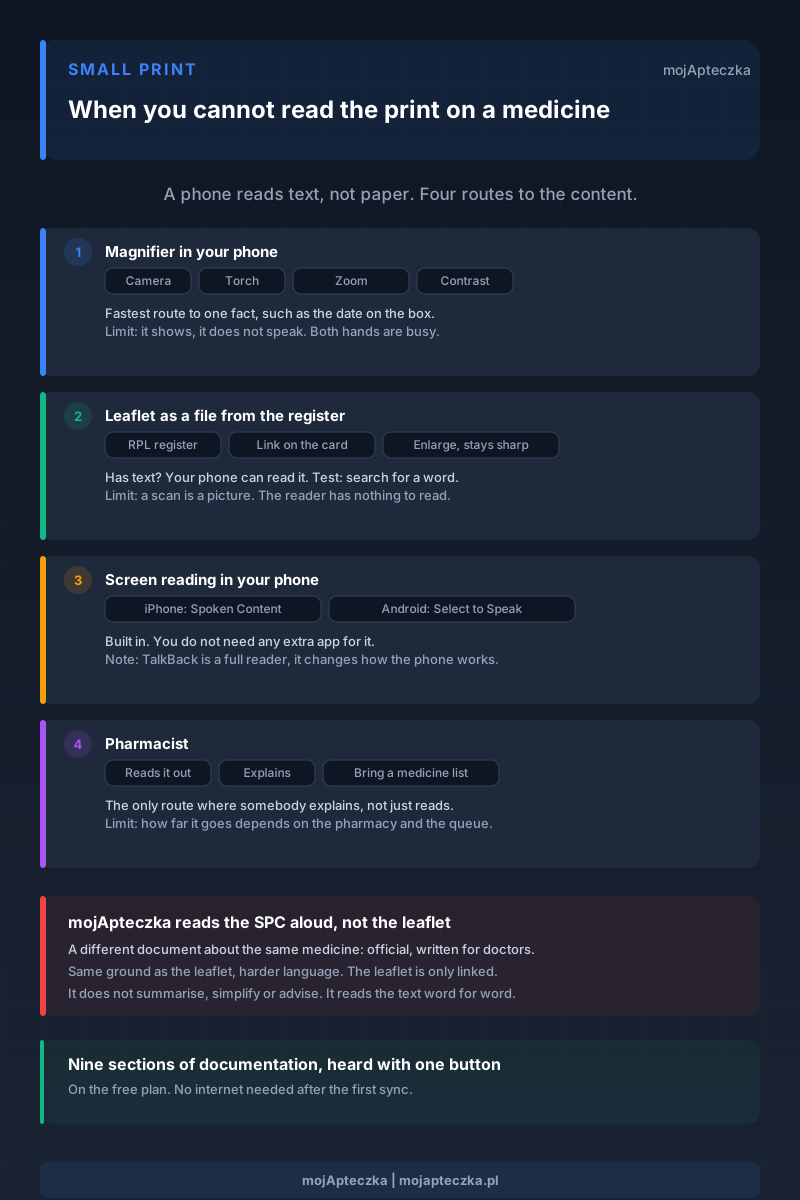
Below are four routes. Each has its own limit, and we say so plainly, so that you do not waste time on the one that happens not to work for you.
Route one: the magnifier in your phone, for a quick enlargement
The simplest and the fastest. Your phone has a camera, a torch and zoom, and together they make a magnifier better than a glass one: it lights the page up, it brings it closer, and on many devices it can raise the contrast or invert the colours, which with thin paper often matters more than the enlargement itself. On the iPhone there is a built-in Magnifier app for this. On Android it depends on the manufacturer.
The limit: a magnifier shows, it does not speak. One hand is holding the phone, the other the sheet. Over several pages of small print that gets tiring, though for checking one single thing, a date on the box for instance, it is perfectly enough.
Route two: the medicine leaflet as a PDF from the register
The same leaflet you are holding is published in the official register of medicinal products as a file you can download. It is sometimes even newer than the sheet from the box, because the packaging may have been printed before the last update to the documents. The medium is completely different, and that changes everything: you can enlarge a file without it going blurry, and if it contains text, your phone can read it aloud.
You do not have to hunt for it blindly. In mojApteczka the medicine card links straight to the leaflet and the SPC in the register, so you open the right document with one tap instead of typing the name of the medicine into a search engine and landing on whatever site comes up. If you want to add the medicine to your cabinet first, a photo of the box is enough for recognising a medicine from a photo. There is more on where to look for trustworthy medicine information in the separate guide.
A limit we have to be honest about: not every file in the register is equally friendly. Some documents contain real text, and then everything works as it should. Others are essentially pictures of pages, scans in other words, and then a screen reader has nothing to read. You cannot tell in advance. The test is simple: open the search in the file and type any word you can see on the screen. If the search finds it, the file has text inside it. If it finds nothing, and you cannot select a single word with your finger, it is a scan and this route is closed to you.
Route three: how to turn on screen reading (iPhone and Android)
Your phone has screen reading built in and you need no extra app for it. It is worth turning on once, because it comes in useful for far more than medicines.
On iPhone: Settings, then Accessibility, then Spoken Content and Speak Screen. From then on, a two-finger swipe down from the top of the screen starts reading whatever is in front of you. In the same place you set the speed and choose the voice.
On Android, look in Settings, under Accessibility, for Select to Speak. Each manufacturer names it slightly differently. You set the speech engine and the language under text-to-speech output: on some phones that sits in the same section, on others, Samsung for example, in the general settings.
You will also find TalkBack there, but that is a different thing. TalkBack is a full screen reader for people who cannot see the screen at all. Once it is on, the whole way you operate the phone changes: one tap only selects, and it takes two to activate. If you can see the print and it is merely too small, TalkBack is not what you are looking for, and it is easy to lock yourself out with it.
The limit: the same barrier as above. Screen reading reads text. Over a photo of paper it stays silent.
Route four: ask a pharmacist
This is the only route where you can ask a person to explain the content, not just read it out. No app does that, ours included. If you still do not know what to do with the content after reading or hearing it, this is exactly the moment.
The limit: this is not a guaranteed or unlimited service. How far the conversation goes depends on the pharmacy, on the time of day and on how many people are standing behind you in the queue. It pays to arrive with a specific question and with a list of the medicines you take, because the conversation is then shorter and more useful. How to put such a list together is set out in our guide to a medicine list for a doctor’s appointment.
mojApteczka reads the medicine documentation aloud. That is not the leaflet
Now the most important sentence in the whole piece, because it would be easy to pass over it, and that would be dishonest.
mojApteczka does not read the patient leaflet aloud. It reads the Summary of Product Characteristics, the SPC, known in Poland as the ChPL. That is a different document. Official, about the same medicine, but written for doctors and pharmacists rather than for you. It covers the same ground as the leaflet, only more broadly and in harder language.
So why listen to it at all?
Because the SPC in the app is text, not a sheet of paper. Text can be enlarged, translated and read aloud. A sheet of paper cannot.
Here is how it works in practice. A speaker button appears on the medicine documentation screen. One tap and the phone reads out the name of the medicine, then the sections that follow. The same button pauses and resumes. There are nine sections: indications, dosage, contraindications, warnings, interactions, pregnancy and breastfeeding, side effects, overdose and storage. Expand specific sections and you hear only those. Expand none and the app reads the lot.
What matters here, precisely when you cannot see the print:
- The voice reads exactly what you see. You will never hear anything other than what is displayed on the screen.
- It works with no internet after the first sync. Before you can listen to anything offline, the documentation has to sync once. After that you can listen in aeroplane mode if you like.
- It is on the free plan. You do not have to buy anything.
- It respects your accessibility settings. The app takes the speed and the voice from your system settings, not from its own. While it reads it lowers other sounds, and restores them when it stops.
When two languages are spoken at home
A separate situation that looks similar, though eyesight has nothing to do with it. The carer speaks Ukrainian, your mother speaks Polish, and the medicine documentation is in Polish only.
You can translate a section of the documentation into English, Ukrainian or Russian, and the translation happens on the device itself. Once a section has been translated, the voice switches to its language. The same rule holds without exception: the app reads what is on the screen. If you are looking at the Polish original, you hear Polish. If you are looking at the translation, you hear the translation.
There is more on organising medicines when a family is spread across two countries in our piece on parents’ medicines from a distance.
What mojApteczka does not do
An honest list, because without it this whole article would be an advert.
- It does not read paper, or a scanned leaflet, aloud. It opens the leaflet as a link to the register, in the browser.
- It does not summarise and does not simplify. It reads the official text word for word. It does not put it “into plain English” and it does not shorten it, because that is where the twisting of content begins.
- It does not advise. It will not judge whether this medicine is right for you, it will not pick a dose, and it will not tell you whether you can combine it with anything else.
- It does not make the SPC any easier. It is a document for specialists and it stays hard even when you listen to it. If your head is spinning after hearing it, that is not your fault and it does not mean you missed something.
- It will not work without a voice on the phone. If your system has no voice installed for a given language, the reading may be unavailable. On Android the button simply will not appear until the speech engine is ready. You add voices in your phone settings.
- We have not tested the whole route with a blind user. We know the button has state descriptions for VoiceOver and TalkBack, and that we take the speed and the voice from the system settings. But the whole path, from adding a medicine to listening to a section, we have not walked with a screen reader. We will not pretend that we have. If you use VoiceOver or TalkBack and something falls over, write to kontakt@mojapteczka.pl. It will genuinely change the order of our work.
What you can do today
Each of these tasks takes a few minutes.
- Turn on screen reading in your phone settings and learn the gesture. It will work everywhere, not just with medicines.
- Add the medicines you take regularly to your cabinet. A photo of the box is enough. The documentation and the links to the documents are then always one tap away.
- Write down what you agree with the pharmacist in a note on the medicine. In three months you will not remember it, and reading your own note is far easier than fighting your way through the leaflet all over again.
- If you care for somebody who cannot see the print, go through these settings together with them, on their phone. Accessibility settings work on one particular device, and turning them on for yourself changes nothing for them. There is more on sharing the load on our page for caregivers and in the guide to a senior’s medicine cabinet.
The small print is not going away. But it is not the only form in which this content exists. There is the sheet, there is the file, there is the official characteristics document, there is the person behind the counter. All you need is for one of these routes to be open to you.
Listen to the podcast: Episode 18 — “The small print” (in Polish) — a conversation between Tomasz and Iza about the four routes to the same content when the print is too small, and why mojApteczka reads the summary of product characteristics aloud rather than the patient leaflet. Also available on YouTube.
Sources
Frequently asked questions
- Does mojApteczka read the patient leaflet aloud?
- No. The app only opens the leaflet as a link to the official register. What it reads aloud is the Summary of Product Characteristics, the SPC, known in Poland as the ChPL. That is a different document about the same medicine. It overlaps with the leaflet in topic areas, but it is not the patient leaflet: it is written for doctors and pharmacists, in harder language.
- Why will my phone not read a paper leaflet?
- Because screen reading works on text, and paper, or a photo of paper, is just a picture as far as the phone is concerned. Newer phones can recognise text in a photo, but across three pages of dense print in two columns the recognition drops fragments and merges the columns. That is why a file from the register, or the documentation inside the app, gives you a more reliable result than a photo of the sheet from the box.
- Do I have to pay to have the SPC read aloud?
- No. Reading the SPC documentation aloud works on the free mojApteczka plan. You do not need the Standard or Pro plan to use it.
- Does the SPC reading work without an internet connection?
- Yes, with one caveat. The voice itself comes from the speech engine in your phone and needs no connection. The SPC documentation is downloaded on the first sync, so it has to sync once before you can listen to it offline. After that you can listen in aeroplane mode.
- Will I hear the documentation in my own language?
- The source data is in Polish. You can translate a section on your device into English, Ukrainian or Russian, and the voice then switches to the language of the translation. The app reads exactly what you see on screen. You will never hear anything other than what is displayed.
- I use a screen reader. Can I get through this on my own?
- The reading button has state descriptions for VoiceOver and TalkBack, and the speed and the voice come from your system settings. We have not, however, tested the whole route, from adding a medicine to listening to it, with a blind user. If something does not work, write to us at kontakt@mojapteczka.pl.
- Does listening to the documentation replace a conversation with a pharmacist?
- No. The app reads the official text out word for word. It does not summarise it, simplify it or advise you. If you still do not know what to do after listening, that is exactly the moment to ask a pharmacist or a doctor.