How to Talk to Your Doctor About Medicines — A Practical Guide
You sit down in the consulting room. The doctor smiles, opens your file, and asks the question you knew was coming:
“What medicines are you currently taking?”
And your mind goes blank. You remember two, maybe three. There is a white pill you take in the morning — but what is it called? Was it 5 mg or 10 mg? You started a supplement last autumn, but surely that does not count. And those allergy tablets you take in spring — you forgot to mention them entirely.
This scene plays out in doctors’ offices every day, all around the world. It is not a memory problem — it is a preparation problem. And it has real consequences for your health.
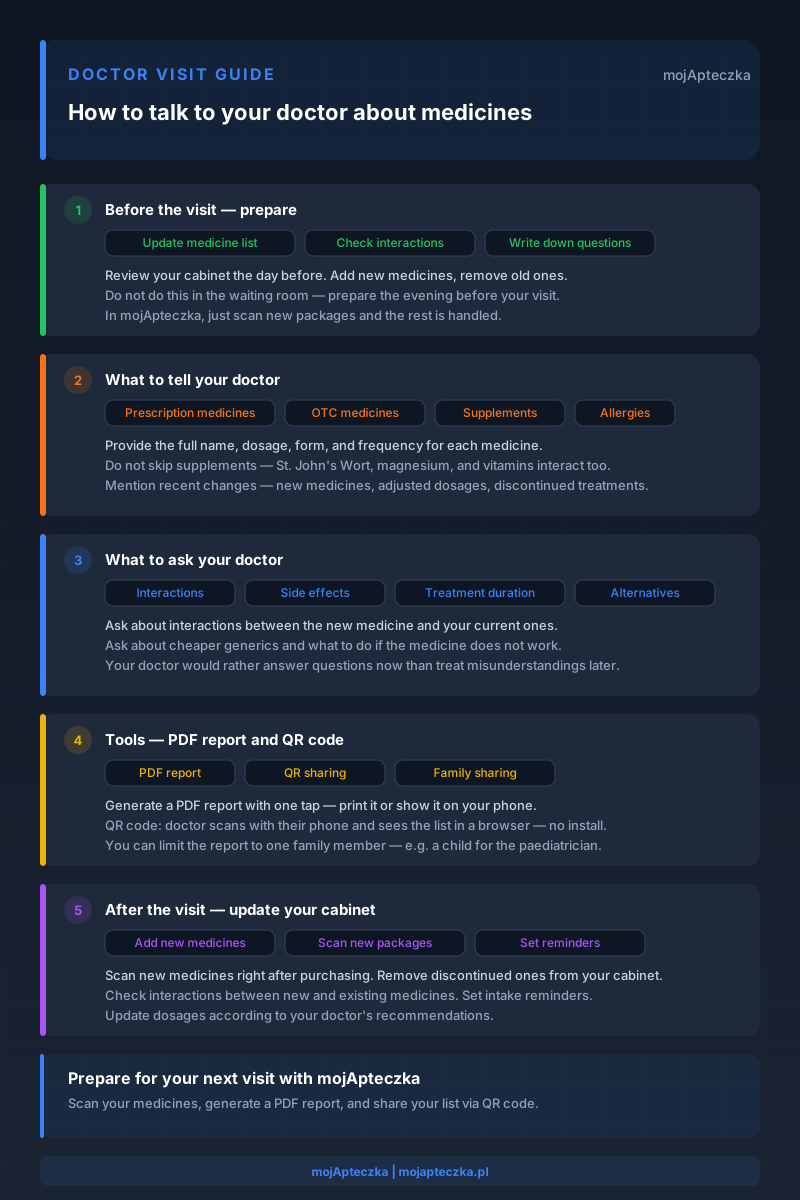
This guide walks you through the entire process: how to prepare before your visit, what to say in the consulting room, what questions to ask, and what to do when you get home.
Why This Conversation Matters
When your doctor asks about medicines, they are not making small talk. That question drives critical clinical decisions that directly affect your safety.
Dangerous interactions
Every new prescription must be checked against your existing medicines. If your doctor does not know you take a blood thinner, they might prescribe an anti-inflammatory that dramatically increases your bleeding risk. If they are unaware of your daily magnesium supplement, they might miss that the new antibiotic will be poorly absorbed.
Research published in the British Medical Journal shows that up to 20% of hospital admissions for people over 65 are related to adverse drug reactions — and a significant portion results from unknown interactions.
Duplicate prescriptions
If you see multiple specialists — cardiologist, endocrinologist, rheumatologist — each one sees only their piece of the puzzle. Without a complete medicine list, it is easy for two doctors to prescribe medicines with the same active substance under different brand names. You end up taking a double dose without realising it.
Incorrect dosages
Many medicines require dose adjustments based on what else you are taking. Without the full picture, your doctor is making decisions based on incomplete data. “I think half a tablet” is not enough information to prescribe safely.
Wasted consultation time
A typical specialist appointment lasts 15 to 20 minutes. If you spend the first five struggling to recall your medicines, you lose a quarter of your visit to something you could have sorted out beforehand. A prepared list gives you that time back for the conversation that actually matters.
Before Your Visit — Prepare
The best conversation with your doctor starts the day before, not in the waiting room. Here is what to do:
Update your medicine list
Go through your medicine cabinet and check what has changed since your last visit. Add new medicines, remove discontinued ones, and make sure dosages are current. If you use mojApteczka, your list is already up to date — just scan any new packages and the rest is handled.
Include everything — not just prescriptions
Many people prepare a list of their prescription medicines and skip everything else. That is a mistake. Your doctor needs to know about:
- Over-the-counter (OTC) medicines — ibuprofen, paracetamol, antacids, nasal sprays, antihistamines.
- Supplements and vitamins — vitamin D, magnesium, iron, omega-3, probiotics.
- Herbal products — St. John’s Wort, valerian, ginkgo biloba. These interact with many prescription drugs.
- Medicines taken occasionally — a migraine pill you take once a month still counts.
Write down your questions
Do not rely on memory. Write down specific questions you want to ask the doctor. Common questions include:
- Can this new medicine interact with something I already take?
- What side effects should I watch for?
- How long should I take this medicine?
- Are there cheaper alternatives with the same active substance?
- Should I take this with food or on an empty stomach?
Check interactions in advance
If you can, check potential interactions before you go. In mojApteczka, add all your medicines and the system automatically analyses over 1.3 million known interactions, flagging any conflicts. You can then arrive at the doctor’s office with specific questions instead of vague concerns.
What to Tell Your Doctor
Once you are in the consulting room, give the doctor the full picture. Do not wait for them to ask about each category separately — proactively share the information.
Current prescription medicines
For each medicine, provide:
- Full brand name — not “those white pills”, but “Amlodipine Teva 5 mg”.
- Dosage and form — tablets, capsules, drops, patches. This matters because the same medicine comes in different forms.
- How often you take it — once daily in the morning, twice daily with food, as needed for pain.
- Who prescribed it — knowing that a heart medicine came from a cardiologist rather than a GP helps the doctor understand the treatment context.
Over-the-counter medicines
Tell the doctor about all OTC medicines you take regularly or occasionally. This includes medicines that seem “unimportant” — paracetamol, ibuprofen, cough medicine, eye drops. Any of them can interact with a new prescription.
Supplements and vitamins
Many people forget to mention supplements because they do not consider them “real medicines”. This is a dangerous oversight. St. John’s Wort reduces the effectiveness of contraceptives and antidepressants. Magnesium decreases the absorption of fluoroquinolone antibiotics. Vitamin K affects blood-thinning medicines. Your doctor needs to know.
Allergies and intolerances
If you have ever had an allergic reaction to a medicine — even a mild one — mention it. The same applies to intolerances: “That medicine made me vomit” or “That supplement gave me diarrhoea” are important pieces of information that influence the choice of a new medicine.
Recent changes
If anything has changed in the past few weeks — you stopped a medicine, changed a dose, started something new — tell the doctor at the beginning of the visit. Recent changes are often more important than the full list, because they can explain new symptoms.
What to Ask Your Doctor
A conversation with your doctor is not just about giving information — it is also about getting it. Here are questions worth asking at every visit:
About interactions
- “Can this new medicine conflict with my current medicines?”
- “Should I change the timing of any of my medicines?”
- “Does my magnesium supplement affect the absorption of the new medicine?”
About side effects
- “What should I expect in the first few days?”
- “Which symptoms are normal and which require medical attention?”
- “Can this medicine cause drowsiness — can I drive?”
About treatment duration
- “How long should I take this medicine?”
- “Is this a lifelong treatment or a temporary course?”
- “When should I come back for a follow-up?”
About alternatives
- “Is there a cheaper version of this medicine — a generic with the same active substance?”
- “Can I switch to an extended-release form to take fewer doses per day?”
- “If this medicine does not work, what are my options?”
Do not hesitate to ask. Your doctor would rather answer questions now than treat the consequences of a misunderstanding later.
The PDF Report — Your Medicine List, Doctor-Ready
Preparing a complete medicine list sounds like a lot of work. But it does not have to be.
mojApteczka automatically creates and maintains your medicine list. You scan packages with your phone — AI recognises the name, dosage, and expiry date. The list is always current because it reflects what you actually have in your medicine cabinet.
Before a visit, you generate a PDF report with one tap. The report includes:
- Medicine names with dosages and forms.
- Expiry dates for each medicine.
- Quantities remaining in your cabinet.
- Assignment to a family member — you can generate a report with only a child’s medicines for a paediatrician.
Print the report or show it to the doctor on your phone screen. It is a clean, professional document — not a screenshot or a chaotic note. The doctor gets the full picture in seconds rather than spending minutes asking about each medicine individually.
No other medicine management app on the market offers a ready-made PDF report for doctors. This feature genuinely changes the quality of medical consultations.
QR Code Sharing — Share Your List in Seconds
No printer? An unexpected appointment you did not have time to prepare for? There is a faster option.
mojApteczka generates a QR code that the doctor scans with their phone. After scanning, they see your medicine list in their browser — without installing any app. They do not need an account, they do not need to download anything.
Key details:
- The link is time-limited. After it expires, the list is no longer accessible. Your data stays protected.
- You can limit the scope. Share only the medicines of a selected family member — for example, a child during a paediatric visit.
- It works on any device. All the doctor needs is a phone camera and a browser.
This is the fastest way to give a doctor your complete, current medicine list — no paper, no dictation, no “I think it was called something like…”.
After the Visit — Update Your Cabinet
The doctor visit is not the end of the process. It is the beginning of a new phase of medicine management. Here is what to do when you get home:
Add new medicines
If the doctor prescribed new medicines, scan their packages in mojApteczka as soon as you buy them from the pharmacy. The app recognises the name, dosage, and expiry date — no manual entry needed.
Remove discontinued medicines
If the doctor said you no longer need a medicine, remove it from your cabinet (and from the app). Do not keep it “just in case” — that leads to confusion and the risk of mixing up medicines.
Update dosages
If the dosage of an existing medicine changed, correct it immediately. Next time you generate a PDF report, the data will be accurate.
Check interactions
After adding new medicines, check interactions with your full set of medicines. mojApteczka does this automatically — if it detects a potential conflict, it notifies you immediately.
Set reminders
New medicines often require regular intake at consistent times. Set reminders before you have a chance to forget the new schedule.
Special Situations
Not every visit is the same. Here are scenarios that require additional preparation:
Taking a child to the paediatrician
When you take a child to the doctor, you need the child’s medicine list — not the whole family’s. In mojApteczka, each medicine is assigned to a specific family member, so you can generate a PDF report or QR code with only your child’s medicines.
Also remember:
- Vitamins and supplements the child takes (vitamin D, probiotics).
- Medicines given occasionally (paracetamol for fever, allergy medicines).
- Any allergic reactions to medicines the child has had in the past.
- The child’s weight — many paediatric medicines are dosed by body weight.
Accompanying an elderly parent
If you care for an older parent and accompany them to appointments, your role is crucial. Older adults often take multiple medicines prescribed by different specialists and may not remember the full list.
Prepare:
- A complete list of the senior’s medicines from all specialists.
- Information about recent changes — new medicines, adjusted dosages, discontinued treatments.
- Observations — do they forget to take medicines, have trouble swallowing tablets, or show new symptoms?
The family sharing feature in mojApteczka lets you manage a parent’s cabinet from your own phone and generate reports on their behalf.
Emergency room visits
In an emergency, there is no time to prepare. That is why it is worth having a current QR code or PDF report always available. If you are unconscious or disoriented, family members can show the doctor your medicine list from the app — it could literally save your life.
Telehealth appointments
During a video consultation, you cannot hand the doctor a printout. But you can:
- Email the PDF report before the call.
- Share a QR code — the doctor can scan it from their computer screen.
- Read the list from the app — which is simpler and more complete than reciting from memory.
FAQ
Do I need to tell my doctor about medicines from other clinics?
Yes — always. Every doctor needs the full picture. A medicine prescribed by a cardiologist can interact with a medicine from an endocrinologist. If you do not mention all your medicines, you risk dangerous interactions.
Are OTC medicines and supplements really important?
Very much so. Supplements and OTC medicines can cause serious interactions with prescription drugs. St. John’s Wort reduces the effectiveness of contraceptives, magnesium decreases antibiotic absorption, and ibuprofen combined with blood thinners increases the risk of bleeding. Your doctor needs the full picture.
What if I cannot remember a medicine’s name?
This is exactly why a digital list is valuable. If you cannot remember, describe the medicine as precisely as possible: colour, shape, size, when you take it. Next time, scan the packages in mojApteczka so you always have the list at hand.
How often should I update my medicine list?
After every change — a new medicine, adjusted dosage, discontinued treatment. If you use mojApteczka, the list updates automatically each time you scan. Additionally, review your entire cabinet every 3 months to make sure nothing has been missed.
Summary
Talking to your doctor about medicines does not have to be stressful or chaotic. It just takes preparation:
- Before the visit — update your medicine list, include supplements and OTC medicines, write down questions.
- In the consulting room — share the full list, mention changes, ask about interactions and side effects.
- After the visit — add new medicines, remove discontinued ones, check interactions, set reminders.
mojApteczka makes each of these steps take seconds instead of minutes. Scan your cabinet once, and the app keeps it current and generates a PDF report or QR code whenever you need one.
Visit mojapteczka.pl and prepare for your next appointment — instead of improvising in the consulting room again.
Read More
- How to Prepare a Medicine List for Your Doctor — A Practical Guide
- How to Check Drug Interactions at Home
- Supplements and Drug Interactions — What You Need to Know
- Polypharmacy — Managing Multiple Medications in the Elderly
- The Caregiver’s Role in Family Medicine Management
- Share Your Medicine List via QR Code
Have questions about preparing for a doctor visit? Write to us at kontakt@mojapteczka.pl — we are happy to help!